
Local, WebDAV, and SFTP
These providers write to your directory or server. Check where the file is stored and how a browser can access it separately. Entering a domain does not turn a directory into a website.
Local: complete a practice upload
Provider ID: local. You need a writable directory, with no account.
- Create a directory in your file manager, such as D:\Pictures\PicList on Windows.
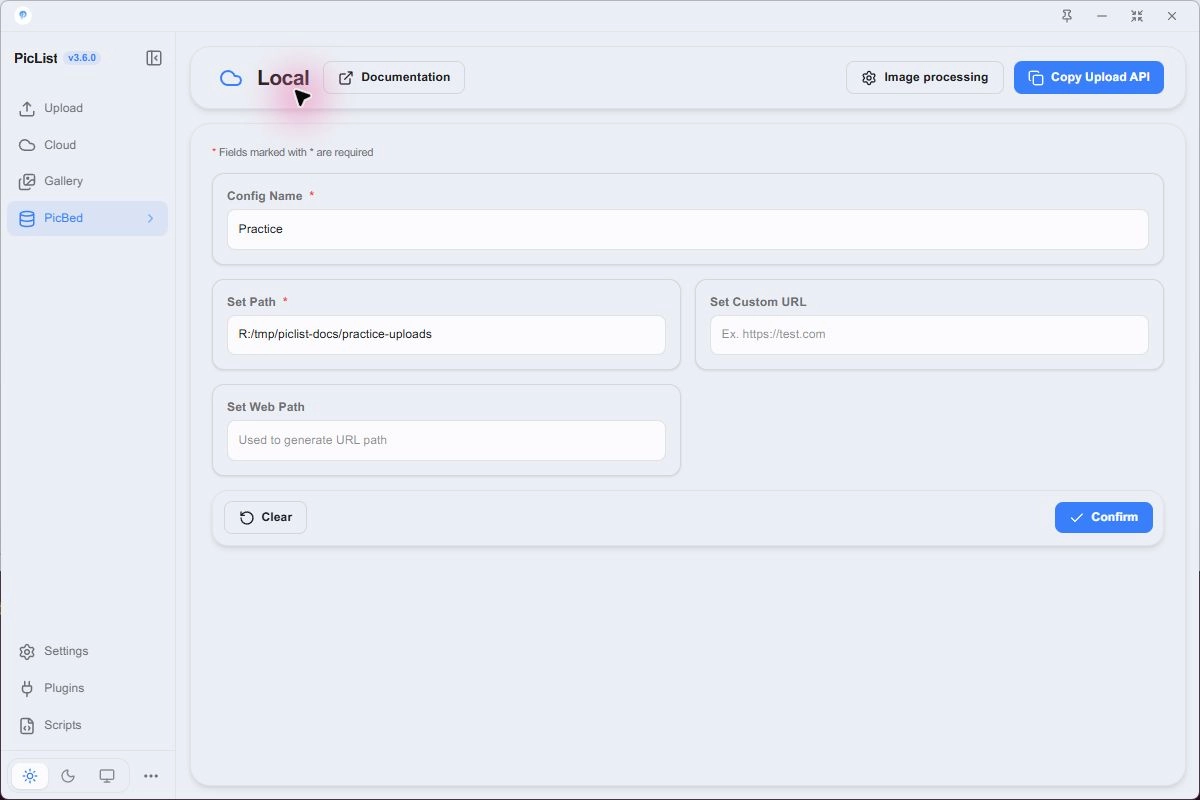
- Choose PicBed → Local → Add New Configuration.
- Name it Practice and enter the full directory in Set Path.
- Leave Set Custom URL and Set Web Path empty, then Confirm.
- Select the card, make Local the default provider, upload a PNG, and check the file in that directory.
| UI / JSON field | Purpose | Example |
|---|---|---|
| Set Path / path | Actual write directory | D:\Pictures\PicList or /srv/www/images |
| Set Custom URL / customUrl | Optional HTTP(S) prefix | https://images.example.com |
| Set Web Path / webPath | Directory in the public URL | gallery/ |
Without customUrl, the result is a local path. It is useful for testing or saving files locally; other people cannot access your image through that path.
Map an existing static website
Suppose your web server already serves /srv/www/images as the root of https://images.example.com. Set path to /srv/www/images, customUrl to https://images.example.com, and leave webPath empty. photo.png is written to /srv/www/images/photo.png and linked as https://images.example.com/photo.png.
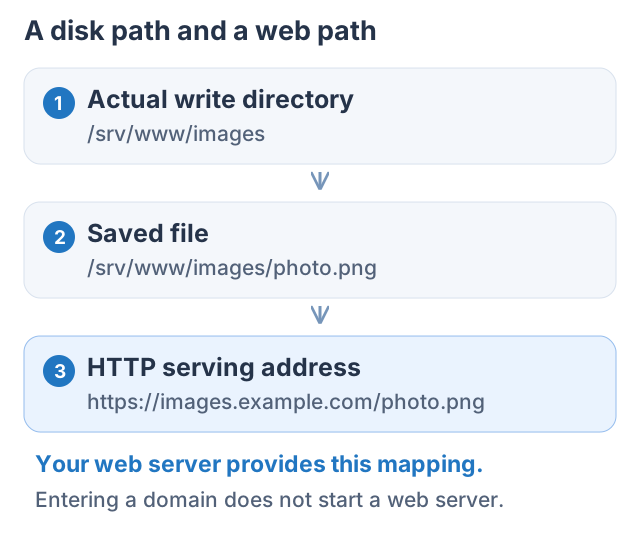
If that directory is served under /gallery/, set webPath to gallery/. Test one image in a browser before using the links in articles.
WebDAV: connect a writable remote directory
Provider ID: webdavplist. Obtain the service's WebDAV address and account, and verify write access with its own client first.
- Open PicBed → WebDAV and add a configuration.
- Set host to the server and interface path, for example dav.example.com/remote.php/dav/files/USER.
- Enable sslEnabled for HTTPS. This switch selects the protocol; writing https:// into host alone is insufficient.
- Enter username and password locally and choose Basic or Digest as required.
- Set path to the WebDAV upload directory, for example pictures/. Save, select, and test an image.
| Field | Purpose |
|---|---|
| host / sslEnabled | WebDAV interface address and HTTPS switch |
| username / password | Credentials entered locally |
| path | Write directory in the service |
| authType | basic or digest |
| customUrl | Optional public prefix |
| webpath | Directory mapping on the public site; JSON uses a lowercase p |
| options | Optional link suffix |
Without customUrl, the result commonly uses the WebDAV address and may require login. If you have a separate public file domain, enter customUrl and its webpath. An empty webpath follows the upload directory.
A WebDAV share page is not necessarily a direct file URL. Check that the response is an image rather than an HTML login or share page.
SFTP: transfer with SSH, serve with HTTP
Provider ID: sftpplist. Prepare an SSH host, port, user, writable directory, and an HTTP(S) address that serves those files.
- Open PicBed → SFTP and add a configuration.
- Set host to the SSH hostname or IP and port to 22 unless yours differs. Do not enter a full sftp:// URL.
- Enter username and either password or privateKey. privateKey is the local path to a private key file, not the key contents. Use passphrase if the key needs one.
- Set uploadPath to the actual server directory, such as /srv/www/images.
- Set customUrl to https://images.example.com. If it maps to that directory's root, set webPath to /.
- Leave permission fields at their defaults unless needed and authorized by the server. Save and test.
| Field | Example or purpose |
|---|---|
| host / port / username | SSH connection |
| password | Password authentication |
| privateKey / passphrase | Local key file path and optional passphrase |
| uploadPath | /srv/www/images |
| customUrl | https://images.example.com |
| webPath | / or a website directory such as gallery/ |
| fileMode / dirMode / fileUser | Optional permissions and ownership; server authorization required |
Without webPath, SFTP can use uploadPath in generated URLs, including /srv/www/images. Set webPath according to your web server mapping. Without customUrl, PicList derives an HTTPS prefix from the SSH host; that host must still provide a working web service.
customUrl must be an HTTP(S) address without credentials, query parameters, or a fragment. The SFTP port is usually different from the website's port.
Verify and troubleshoot
| Symptom | Check |
|---|---|
| Local file is missing | Active path, final filename, another named directory configuration |
| WebDAV 401 | Account, HTTPS switch, Basic / Digest, interface path |
| SFTP connection fails | Host, port, user, authentication, readable key file |
| Permission denied | Directory write access and authorization for optional chmod/chown |
| Upload succeeds, URL is 404 | customUrl and webPath match the actual website |
| Preview works only inside PicList | Localhost cache or authenticated access |
These providers can use a local preview cache. localhost:36699 addresses are for in-app previews on this machine. Publish a reader-accessible URL. Removing a gallery record, clearing a cache, and deleting a destination file are separate operations; see Gallery and links.